
POP717 Deposit & Withdrawal Guide
How money moves in and out of POP717: where the Deposit and Withdraw buttons are, what to check before each POP717 withdrawal, how play-through affects rewards, and how to track every request in My Orders and Reports.
New to the app? Read the POP717 hub first.
2
Deposit buttons
1
Withdraw button (Mine)
1x+
Play-through on rewards
24/7
Order tracking
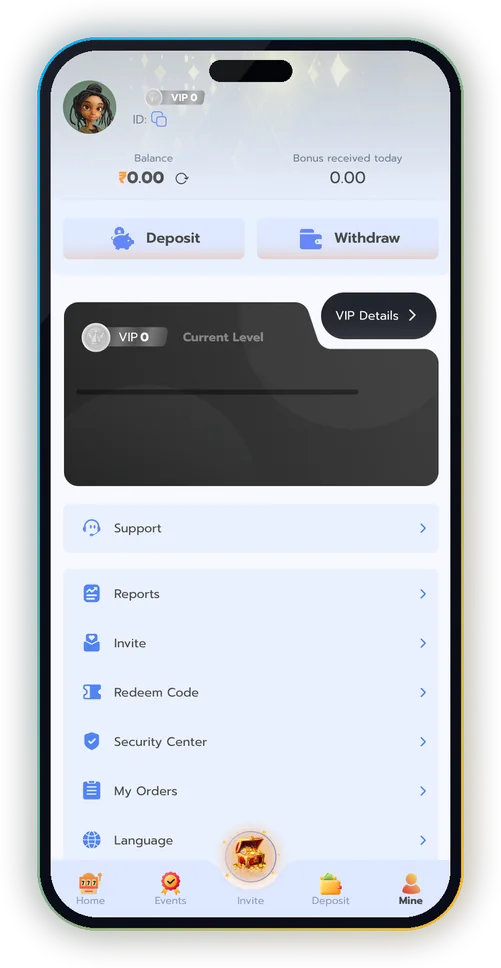
Where the Wallet Buttons Are
| Button | Where |
|---|---|
| Deposit | Bottom bar, and Mine |
| Withdraw | Mine (next to Deposit) |
| My Orders | Mine menu |
| Reports | Mine menu |
| Balance refresh | Icon next to your balance on Mine |
How to Make a POP717 Deposit
- Tap Deposit on the bottom bar or on Mine.
- Choose one of the methods shown for your account.
- Enter the amount.
- Pay from your own UPI or bank app, for the exact amount shown.
- Return to POP717 and tap refresh next to your balance.
Keep the payment reference (UTR) from your bank app until the deposit shows in My Orders. It’s the first thing Support needs if anything is delayed.
Before Every POP717 Withdrawal
- Payout details are in your own name.
- Any reward you received has finished its play-through (check the reward in Events).
- No game is still open with money inside it; close it and refresh your balance.
- You know the amount you want; start small the first time.
How to Withdraw
- Open Mine → Withdraw.
- Add or choose your payout details.
- Enter the amount and confirm.
- Track the request in My Orders.
Play-Through, Explained Simply
| Reward | Play-through | Means |
|---|---|---|
| ₹100 at 1x | ₹100 | Wager ₹100 in total before withdrawing it |
| ₹100 at 3x | ₹300 | Wager ₹300 in total |
| No reward taken | – | Only normal rules apply |
The exact rule is printed on each reward in Events. When in doubt, ask Mine → Support before playing.
Reports: See What You Really Spent
Mine → Reports lists deposits, bets and withdrawals in one place. Checking it once a week is the easiest way to keep POP717 a game, not a habit.
Wallet Problems and Fixes
PROBLEM
Deposit not showing
Why: Bank delay or wrong amount paid.
Fix: Wait a few minutes, refresh, then send the UTR to Support.
PROBLEM
Withdraw button blocked
Why: A reward still has play-through left.
Fix: Check the reward in Events.
PROBLEM
Balance lower than expected
Why: Money is inside an open game.
Fix: Close the game fully and refresh.
PROBLEM
Withdrawal pending long
Why: Payout details mismatch.
Fix: Check the name on your account; contact Support with the order number.
Frequently Asked Questions
Where is the POP717 withdraw button?
On Mine, next to Deposit.
How do I track a POP717 deposit?
Mine → My Orders.
Why can’t I withdraw my bonus?
Its play-through isn’t finished yet; check the reward in Events.
Can I withdraw to someone else’s account?
Use payout details in your own name.
Explore More of POP717
The full POP717 hub
Android, iPhone and APK safety
Username sign-in, answered
Your first 10 minutes
Signup bonus, codes and Events
138 tables, crash, cards, fishing
Support, Security Center, scams
Invite Center and commission
POP717 and other app screens
Manage Your POP717 Wallet
Open Mine for Deposit, Withdraw, My Orders and Reports.
18+ only · Real-money games carry financial risk · Play within limits · Help: Tele-MANAS 14416